October 22, 2026 | MSP | 7 min read
AI Automation for MSPs in South Florida: What It Actually Means
Every MSP owner in Miami, Fort Lauderdale, and the rest of South Florida has heard some version of the same pitch lately. "AI automation" gets dropped into cold emails, LinkedIn posts, and conference booths like it's one single product you can buy off a shelf. It isn't.
For an MSP specifically, AI automation means something narrow and specific: the repeatable admin sitting on top of your technical work, handled through the apps you already use, with a human still approving anything that reaches a client. Everything else is marketing language.
Why "AI Automation" Means Something Different for Every MSP
Walk into any South Florida business event right now and you'll hear the phrase thrown around by agencies selling very different things. Some mean chatbots on a website. Some mean a voice system answering phones. Some just mean "we use ChatGPT internally."
For an MSP, none of those generic definitions match the actual problem. Your techs aren't struggling because your website lacks a chat widget. They're struggling because the admin around service delivery, proposal follow-up, renewal tracking, reporting, lead triage, keeps landing on people who are paid to fix infrastructure, not chase paperwork.
This is where the term gets misapplied most often. An agency sells "AI automation" as a blanket fix, an MSP owner buys it expecting something transformative, and six weeks later nothing has actually connected to their systems because nobody scoped the real workflows first. At BayksCloud, we build AI Employees and workflow automations around the specific admin pile inside your business, not a generic script pulled from a sales deck.

Book a Free AI Employee Assessment Call
The Admin Layer South Florida MSPs Usually Automate First
When we sit down with an MSP owner in Miami or Fort Lauderdale for a free strategy call, the first conversation is never about technology. It's about where the hours actually go. Almost every time, the answer lands in the same handful of places.
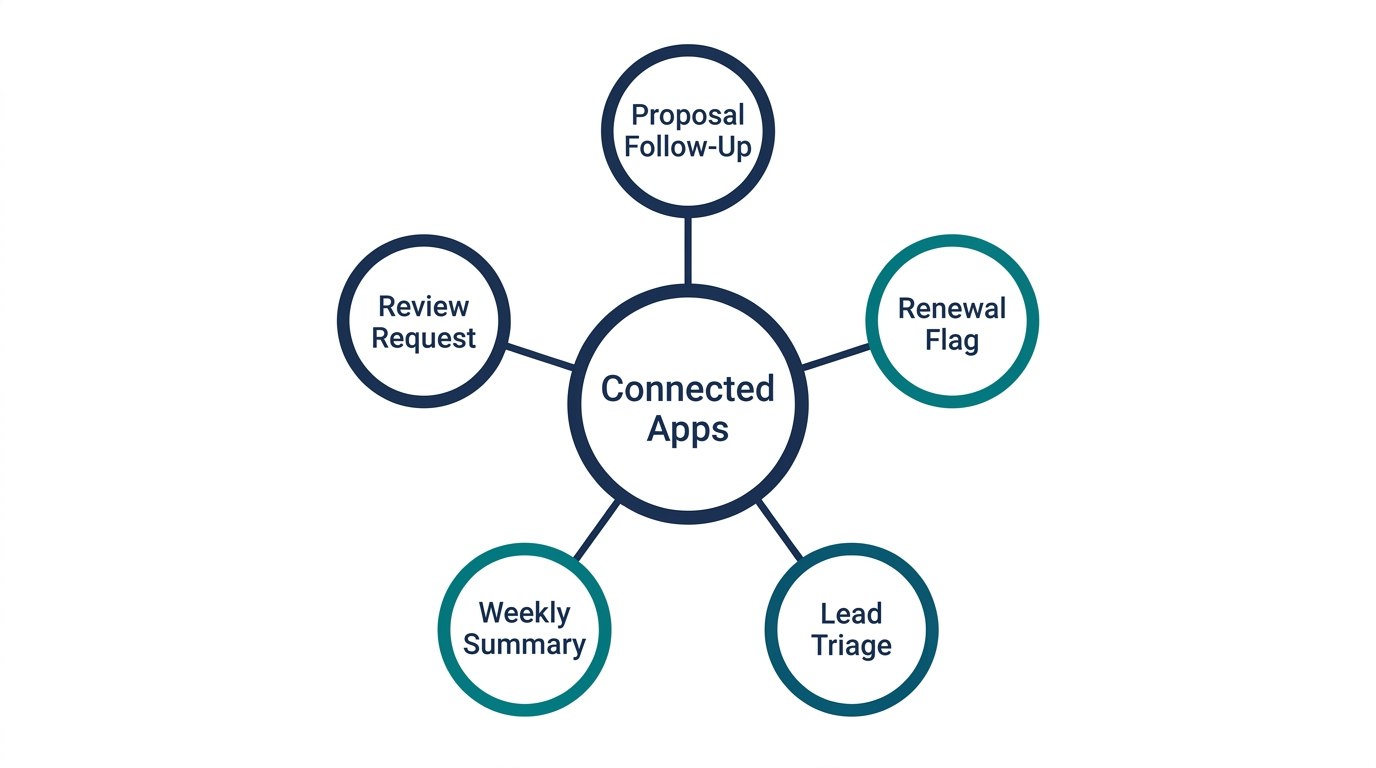
Once the relevant apps are connected and the AI Employee has the data it needs, here's what typically gets automated first for an MSP:
Drafting a follow-up message when a quote or proposal has sat untouched for several days
Flagging an upcoming contract renewal pulled from connected CRM or billing data
Sorting new inbound leads and drafting a first response for a human to approve
Compiling a recurring internal summary ahead of a weekly ops meeting or a QBR
Drafting a review request once a project is marked complete in a connected system
None of this touches your ticketing workflow directly. It runs inside Slack or Microsoft Teams, where your team sees exactly what's about to be sent before it goes anywhere. If your PSA, whether that's ConnectWise, Autotask, HaloPSA, or something else, offers an approved connection, that can be part of the setup too. We never assume access exists. We confirm it first.
What Local Automation Can't Replace
This matters more in South Florida than people assume, because the market here runs heavily on referrals and face-to-face trust. An MSP owner in Coral Gables isn't closing a contract because a draft email went out on time. They're closing it because a prospect trusted them after a real conversation.

An AI Employee does not place or answer phone calls, and it should not be making judgment calls on pricing negotiations, handling an upset client, or representing your business in a relationship-driven conversation. That work stays with your team. Automation here is meant to clear the admin away from your people, not replace the reason clients choose a local MSP over a national call center in the first place.
Setting It Up Without Disrupting Your Tech Team
The MSPs who get the most out of this start narrow. One or two connected apps. One or two repeatable tasks. Everything set to review-first so nothing customer-facing sends without a human checking it.
Someone on your team needs to own the workflow once it's live, which mostly means glancing at drafts, correcting tone when it's off, and updating instructions as your process changes. This is lighter than managing a new hire, but it isn't nothing, and treating it as a one-time install is how automation projects quietly die three months in.
Before connecting anything to client data, we walk every MSP through the same checklist: what exactly will it access, can that access be scoped down, who reviews output before it reaches a client, and how fast does a mistake get caught. If a South Florida MSP owner can't answer those clearly yet, that's a sign to start smaller, not to skip the questions.
Where South Florida MSPs Typically Start
Workflow | Apps Typically Connected | Who Still Approves |
|---|
Proposal follow-up | CRM or quoting tool | Sales owner |
Renewal tracking | Billing or contract system | Account manager |
Lead triage | Inbox or CRM | Sales rep |
Weekly ops summary | Reporting or dashboard tools | Operations lead |
Review requests | Project management tool | Project owner |
Biggest Takeaways
AI automation for a South Florida MSP isn't a single product and it isn't a replacement for your team. It's a scoped set of workflows, built around the apps you already use, that takes repeatable admin off your techs so client relationships and technical judgment stay exactly where they belong.
The phrase "AI automation" means different things depending on who's selling it, so scope the actual workflow before buying anything.
Connected-app admin like proposal follow-up, renewal tracking, and lead triage is where this works best, with a human approving anything client-facing.
Starting with one or two workflows beats a full rollout, especially for an MSP balancing this against daily service delivery.
At BayksCloud, we don't guess at what a South Florida MSP needs. We build your AI Employee around your actual quote flow, your actual renewal cadence, and your actual lead intake, the same approach we used in AI employee for managed service providers and in our breakdown of AI employee vs virtual assistant for MSPs. If you want to see what a scoped pilot would look like inside your own tools, talk to our team before committing to anything bigger.
Try Viktor AI Employee For Free
Frequently Asked Questions
What does "AI automation for MSPs" actually mean in practice?
It means connecting your existing apps so repeatable admin, like proposal follow-up or renewal tracking, gets drafted automatically while a human still approves anything client-facing.
Is this the same as hiring an AI automation agency in Miami or Fort Lauderdale?
Many agencies in the area use that label loosely. At BayksCloud, we specifically build AI Employees and workflow automations scoped to your actual tools, not a generic automation package.
Does AI automation replace my support or sales staff?
No. It takes repeatable admin off their plate so they spend more time on judgment calls, technical work, and client relationships.
Can it integrate with my PSA like ConnectWise or Autotask?
Often, yes. It works with 3,200+ apps through MCP, plus custom API connections for anything else, so a PSA does not need a built-in connection. We confirm access to your specific platform before building anything, and we never assume it's available.
Does the AI Employee answer phone calls for my MSP?
No, it does not place or answer calls. It works inside Slack or Microsoft Teams, drafting and managing admin for your review.
How is this different for an MSP in South Florida versus other regions?
The workflows are the same everywhere, but South Florida's referral-driven market means client relationships matter even more, which is why automation here focuses on admin, not replacing conversations.
How much does AI automation cost for an MSP?
Cost depends on the number of workflows and apps connected. Recovering even one or two missed follow-ups or renewals typically covers the investment.
What CRM do I need for this to work?
You don't need a specific one. Viktor is not a GoHighLevel tool. It works with 3,200+ apps through MCP, plus custom API connections for anything else, so it can work with most CRMs. ok a free 20-minute consultation to discuss your specific setup.
How long does setup take?
Once requirements are gathered, we typically have an AI Employee live within 72 hours.
Should I automate everything at once or start small?
Start with one or two repeatable workflows and scoped app access. Expand once you've seen a few weeks of accurate, reviewed output.

 Eric Adjei Published on: 04/08/2026