AI Employee Cost for MSPs: What Actually Drives the Price
Ask three MSP owners what they would pay for an AI Employee and you'll get three different numbers, usually followed by "it depends on what it does." They're right. "How much does an AI Employee cost?" is typically the second question we hear, right after "what does it actually do?", and the honest answer starts with the second one.
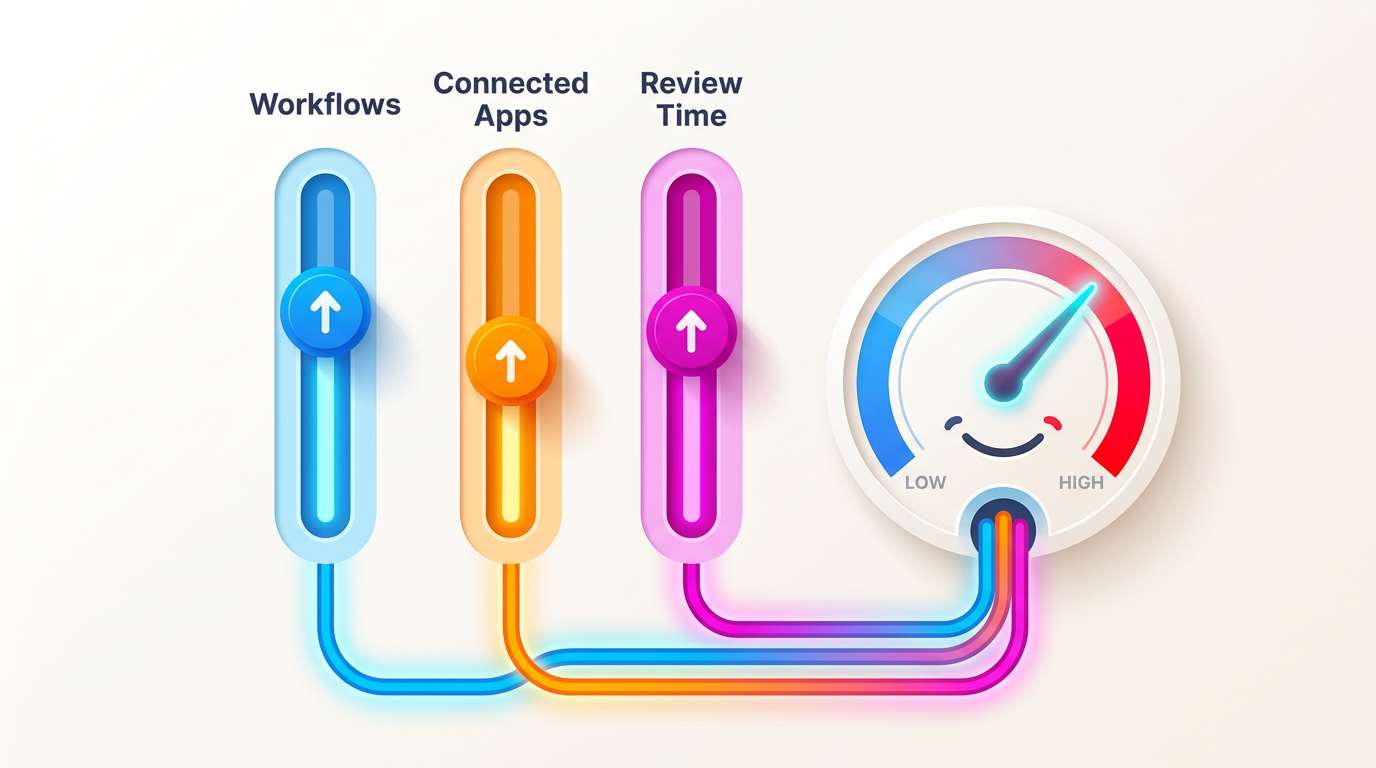
The cost of an AI Employee for an MSP is driven by three things: how many workflows you connect, how many apps those workflows touch, and how much ongoing review and upkeep the setup needs. One connected workflow costs less to build and maintain than five workflows spanning a CRM, a billing tool and a project system.
Why There's No Flat Number to Quote
Picture two MSPs of the same size. The first has a tidy CRM and a billing system that matches it. The second has three spreadsheets, a PSA nobody fully trusts, and a Google Sheet built two years ago that still runs half the renewal tracking. On paper their admin looks identical: proposal follow-up, renewal flags, lead triage. In practice, automating the second one takes far more groundwork, because the data has to be cleaned up and connected before anything useful can happen.
That is why a flat quote before anyone has seen your setup skips a step. At BayksCloud, we map your real quote flow, your real renewal cadence and your real lead intake first. The scope decides the price, not the other way around.
Think of these as three sliders. Push any one of them up and the cost follows.
How many workflows you run. A single chore, like nudging a proposal that has gone quiet, is a small build. Five chores spanning sales, renewals and reporting is a bigger one, and each addition brings its own setup and its own review.
How many apps those workflows touch. A chore that only needs your CRM is simple. One that has to read from your CRM, your billing tool and your project tool at the same time is not. A PSA is one more app to confirm. Viktor works with 3,200+ apps through MCP, plus custom API connections for anything else, so a PSA does not need a built-in connection, but we confirm access to yours before building anything.
How much review it needs. In review-first mode, someone checks drafts regularly, especially in the first few weeks. More workflows mean more drafts to check. It is a modest effort, but it is part of the real cost over time, not just the setup.
None of this is a reason to buy a bigger package because it sounds more impressive. The MSPs that get the most value start narrow, with one or two chores they've already confirmed are repeatable, and expand once they've seen it work. Our hiring checklist for MSP owners walks through how to pick those first chores.
What You're Actually Paying For
It helps to think of an AI Employee less like software off a shelf and more like building a role. You're paying for the initial setup, the app connections, and the ongoing oversight that keeps the work accurate as your business changes. That is different from a flat software subscription. It is also different from a full-time hire, because there is no recruiting, no training ramp and no turnover risk built into the picture.
The clearest contrast is with a virtual assistant. An assistant's cost scales with hours worked. An AI Employee's cost scales with the number and complexity of the workflows it runs. We compare the two in depth in AI Employee vs Virtual Assistant: What MSPs Should Hire. If you like to think in terms of total cost of ownership, count setup, connections and review time together rather than any single line.
Why Recovering Just One or Two Missed Items Usually Covers It
Here is the practical way most MSP owners end up thinking about it. If a single missed renewal or a single quote that never got a follow-up costs more in lost recurring revenue than the whole setup, the investment made sense before it started. We won't put a number on that here, because it depends on your average contract value and how often those things slip today. You can run the math in three steps:
Take your average yearly contract value.
Count the renewals that slipped or the quotes nobody followed up last quarter.
Multiply the two, then compare the result with the cost of a small pilot.
Three common starting points show how the factors combine. These describe shape and effort, not prices, because the numbers depend on your stack.
Scope
What it usually looks like
Review time
Starter pilot
One system, usually your CRM. One or two chores, such as proposal nudges and lead sorting.
Light: a few drafts to check each week.
Growing setup
CRM plus a billing tool. Three or four chores, adding renewal flags and a weekly summary.
Steady: a short daily look at drafts.
Broad rollout
CRM, billing, project tool and PSA working together. Five or more chores.
Heavier: daily review and regular instruction updates.
Four questions worth bringing to a scoping call, whoever you talk to:
Which two chores would hurt most if they slipped again this month?
Where does the data for those chores live today, and is it kept current?
Who would review the drafts each week?
Does anything need access to client data, and can that access be narrowed?
Biggest Takeaways
There is no flat answer to what an AI Employee costs for an MSP. The real drivers are the number of workflows, how many apps they touch, and how much ongoing review they need, not a one-size-fits-all package price.
Start with one or two tightly scoped workflows to keep cost and complexity low while you learn what works.
Clean, centralized data lowers setup effort more than any other single factor.
Weigh the cost against what one missed renewal or unfollowed proposal is costing you today.
At BayksCloud, we scope every build around your actual admin, not a generic package, which is why a free strategy call is the right first step before a number ever gets discussed. Once you know your two or three chores, you can also see how an AI Employee handles lead follow-up and client acquisition, then try it below.
There isn't one flat price, because cost follows the number of workflows and connected apps. Catching even one or two missed follow-ups or renewals can pay for a good part of the investment, which is why many owners treat a small pilot as a low-risk first step.
Is it cheaper than hiring a virtual assistant?
It scales differently. A virtual assistant's cost grows with hours worked, while an AI Employee's cost grows with the number and complexity of the workflows it runs. Which one is cheaper depends on how much repeatable admin you actually have.
Does connecting more apps always cost more?
Generally, yes. Each extra app adds setup and review work. Starting with one or two apps keeps the first build simple and the results easy to judge.
What ongoing costs should I expect beyond setup?
Mostly a little review time and the occasional update to its instructions as your process changes. That is much lighter than managing a new hire, but it is not zero.
Does my CRM affect the cost?
Your data affects it more than your brand of CRM. Viktor is not tied to one CRM. It works with 3,200+ apps through MCP, plus custom API connections for anything else, so most systems can be connected. What changes the scope is how clean and centralized your data is. Book a free 20-minute consultation to talk through your setup.
How fast can I see if the cost was worth it?
Once we have your requirements, we typically have an AI Employee live within 72 hours, so a 30-day pilot gives you a clear read on value fairly quickly.
Eric Adjei|AI & Digital Marketing Strategist and Business Coach|
Eric Adjei is an AI & Digital Marketing Strategist and Business Coach with over 20 years in the IT and digital marketing space, and founder of BayksCloud Consultants LLC - a digital marketing agency in the Miami–Fort Lauderdale metro area, South Florida. He specializes in helping Managed IT Services (MSPs), Medical Spas (Medspas), and HVAC companies replace manual operations and missed leads with AI employees, intelligent CRM systems, and digital marketing strategies that work around the clock.

 Eric Adjei Published on: 04/08/2026